Handling customer emails shouldn’t be playing hide-and-seek. But if you’re using regular Gmail for your growing business, that’s what happens on a daily basis.
What Is a Unified Inbox Gmail?
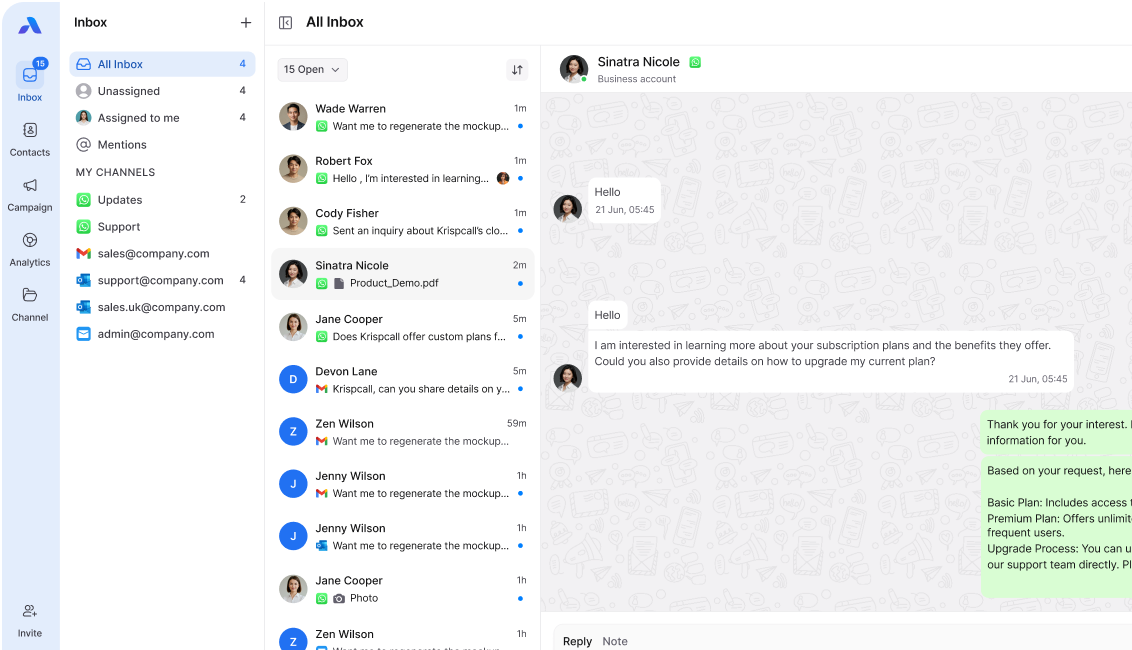
Gmail unified inbox is a clever tool designed to unify all of your team’s Gmail messages in one common area. Messages will no longer be scattered across individual inboxes but will be accessed by all users in a common location.
So, think about it like this: A regular Gmail is like your whole class getting different assignment papers. A unified inbox Gmail is like your whole class sharing a giant whiteboard that shows them assignments that everyone is working on.
This is a feature of a process known as omnichannel communication. Omnichannel communication refers to dealing with customer communications from Gmail, WhatsApp, Facebook, or any other platform together. The unified inbox Gmail channel allows your email communications to link with any other message your customers send you.
Why Gmail Becomes Hard to Manage as Teams Grow

Gmail has limitations. Gmail is built for one person managing one inbox. When more people need to handle the same emails, problems start.
Here’s what goes wrong:
● An email arrives, but no one is clearly responsible
● Someone reads it, but others don’t know if it’s handled
● Another teammate replies to be safe
● Attachments and context get buried in long threads
● Managers can’t see who is working on what
Gmail helps send and receive emails. It doesn’t help teams coordinate work around them.
The Real Problems Teams Face with Regular Gmail
When Gmail is used by teams:
● Emails stay in individual inboxes
● Ownership is unclear
● Managers keep checking manually
● Customers wait longer than they should
Imagine a customer sends an important question. It lands in your support email. Three team members see it. One thinks someone else will reply. Another starts typing a response. The third has already sent an answer ten minutes ago. Now your customer gets two different replies, and everyone wasted time.
This isn’t just annoying. It costs money and loses customers.
How a Unified Inbox Gmail System Fixes Everything
A proper unified inbox Gmail solution changes the game completely.
You get:
● One shared view of all Gmail emails
● Clear ownership for every conversation
● Full visibility for managers and team leads
When an email arrives in your unified inbox Gmail, the system shows it to everyone. But here’s the smart part: someone can claim it or a manager can assign it. Now everyone knows who’s handling it. No confusion. No duplicate work. No ignored customers.
The omnichannel unified inbox Gmail goes even further. Your customer emails from Gmail appear right next to their WhatsApp messages and Facebook comments. You see the complete conversation history, not just pieces scattered everywhere.
What Makes a Great Unified Inbox Gmail Solution
Not all systems are equal. Here’s what actually matters:
Team collaboration features: Users require tagging of team members, commenting internally for future references, and a smooth handover of discussions.
Assignment and Monitoring: Managers should understand who is working on which assignment without inquiring directly from everybody.
Response Templates: Answer common questions easily by using prepared responses.
Search that actually works: Find old conversations, attachments, and customer details instantly.
Mobile access: Your team doesn’t sit at desks all day. A unified inbox like Gmail should also function for cell phones.
Integration with other tools: Integration with other tools: Link your CRM tools, helpdesks, and other business tools.
Direct Benefits Your Team Will Notice Directly
- Speed improves dramatically. Customers get faster replies because nothing falls through the cracks.
- Accountability becomes automatic. Everyone knows their responsibilities without daily reminder meetings.
- Managers save hours every week. No more asking “Did anyone reply to that customer?” or checking five different inboxes.
- Customer experience gets better. They receive consistent, informed responses instead of confusion.
- Your team feels less stressed. Clear systems mean there is less anxiety of missed communications.
Switching Is Simpler Than You Think
A move over to a single inbox Gmail account does not mean leaving Gmail. The email addresses will remain the same. Customers will notice nothing different.
The unified inbox Gmail channel simply organizes everything better on your team’s side. It’s like keeping your same phone number but getting a much better phone.
Most modern omnichannel platforms set up in minutes, not weeks. Your Gmail connects with a few clicks. Your team gets trained in one short session. You start seeing benefits immediately.
Stop Playing Email Roulette with Your Customers
Every day without a unified inbox Gmail system costs you money. Missed emails mean lost sales. Slow responses mean frustrated customers who go to competitors. Confused teams mean wasted hours.
Ready to transform how your team handles Gmail forever?
Try Airchannel.ai free for 14 days and watch your email chaos disappear. No credit card needed. No complicated setup. Just connect your Gmail and see your team’s productivity soar. Your customers will thank you. Your team will thank you. Your manager will definitely thank you.
Start Your Free Trial Now → Because your team deserves better than email roulette.