What Is a Unified Inbox?
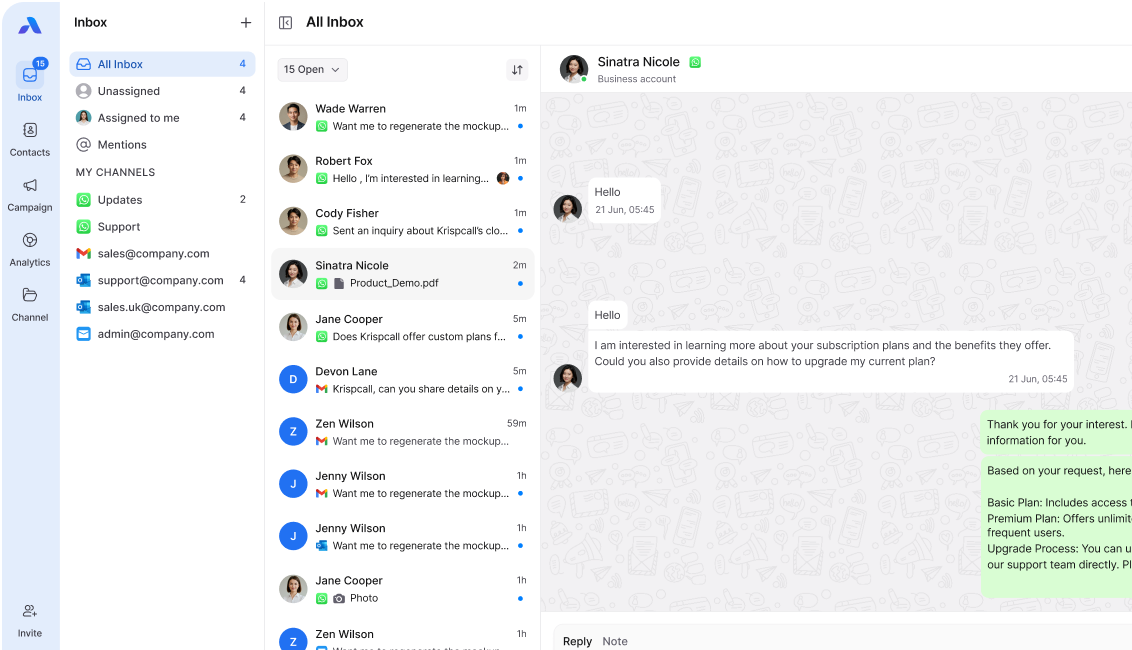
A unified inbox is a place where all your messages come together in a single inbox. Instead of checking WhatsApp, emails, and other apps separately, you see everything on one screen.
Think of it like a mailbox at your home. All your letters arrive in one box, no matter who sent them. This system does the same thing for your digital messages.
Why Does It Matter?
In today’s world, we use many apps to communicate:
- Email for work
- WhatsApp messages for quick chats
- Outlook for business emails
- Social media messages
- SMS texts
Checking all these apps takes time and causes stress. A unified inbox solves this problem by bringing everything together.
The Problem: Managing Several Communication Channels

Challenges You Face Daily
When you use many different apps for communication, several problems emerge.
Time Wasted
- You spend 10 minutes checking your email
- Then 5 minutes on WhatsApp
- Then another 5 minutes on other apps
- This adds up to hours every week
Missed Messages
- Important messages get lost in different apps
- You forget to check one app and miss urgent requests
- Customers wait too long for replies
Confusion and Stress
- You can’t remember where someone sent their message
- Switching between apps breaks your focus
- Team members don’t know who replied to what
Poor Team Collaboration
- One person sees a message on email
- Another person sees a different message on WhatsApp
- Nobody knows the full conversation
- Work gets duplicated or forgotten
Benefits of Using a Unified Inbox
1. Save Time and Boost Efficiency
Centralized communication allows you to manage everything from one place instead of switching between multiple apps. Instead of spending nearly 50 minutes checking emails and messaging platforms separately, a unified inbox lets you handle all messages in about 20 minutes, saving you around 30 minutes every time.
2. Better Organization
With all conversations in one place, messages are neatly organized and easy to find. You can search across platforms, filter messages by customer or topic, and view the complete conversation history in a single timeline, making communication more structured and manageable.
3. Faster Response Times
When messages are centralized, responses become quicker and more consistent. You can reply without switching apps, instantly spot urgent requests, and ensure customers and team members are never left waiting.
4. Improved Team Productivity
A unified inbox helps teams collaborate more effectively by giving everyone visibility into the same conversations. This eliminates duplicate replies, allows clear task assignments, and enables smooth switches between team members.
5. Reduced Stress
With fewer apps and better control, communication feels simple and calm. You stay focused and don’t feel overwhelmed by too many messages.
Key Features to look for
When choosing a system, look for these important features:
1. Multiple Channel Support
A good unified inbox should bring all communication channels together. This includes email integration through IMAP with support for providers like Gmail, Yahoo, and custom domains, while allowing you to keep your existing email addresses. It should also offer full Microsoft Outlook integration, syncing emails, calendars, and contacts seamlessly with Office 365.
In addition, the platform should support WhatsApp Business, allowing you to read, send, and reply to customer messages directly from the inbox without opening the WhatsApp app.
Other Channels
- SMS text messages
- Social media messages (Facebook, Instagram)
- Live chat from your website
- Phone call logs
2. Message Assignment
Conversation assignment is essential for team efficiency. The system should allow you to assign messages to specific team members, track who is handling each conversation, prevent duplicate replies, and clearly define ownership for every request.
3. Shared Drafts and Collaboration
Collaboration features help teams work together smoothly. Look for the ability to save draft replies for review, request approvals before sending messages, share response templates across the team, and maintain consistent messaging for customers.
4. Automation and Smart Features
Automation saves time and reduces manual effort. Auto-routing should direct sales inquiries to the sales team and support questions to the support team, with routing based on language or location when needed. Quick replies and templates help speed up responses while still allowing personalization. Tags and labels should be available to organize messages by topic, priority, or status, making filtering and searching easier.
5. Search and Filtering
A powerful search function is critical. The platform should allow you to search across all channels at once, filter messages by date, sender, or keywords, and instantly view full conversation history.
6. Mobile Access
Access your messages anywhere:
- Mobile apps for iOS and Android
- Responsive web interface
- Reply on the go
How it Improve Productivity and Communication
For Small Businesses
Example: A Local Bakery
Maria owns a bakery. She gets orders through:
- WhatsApp from regular customers
- Email from corporate clients
- Phone calls for custom cakes
- Facebook messages from new customers
Before using a unified inbox, Maria missed orders because she didn’t check WhatsApp in time.. She also sent duplicate replies on email and WhatsApp to the same customer.
Now with a centralized communication, Maria:
- Sees all orders in one place
- Never misses a message
- Responds in 5 minutes instead of 2 hours
- Her sales increased by 30%
For Support Teams
Example: A Software Company
A tech support team receives questions through:
- Email support tickets
- WhatsApp business account
- Website chat
- Social media
With a shared inbox, the team:
- Assigns tickets to available agents
- Sees which agent is handling each issue
- Shares complex cases easily
- Reduces average response time from 2 hours to 20 minutes
For Sales Teams
Example: A Real Estate Agency
Sales agents communicate with clients via:
- Email for documents
- WhatsApp for quick updates
- SMS reminders
- Outlook calendars
With centralized communication, agents:
- See all client interactions in one timeline
- Never miss follow-up opportunities
- Share leads smoothly
- Close deals 40% faster
Real-Life Scenarios Showing Their Usefulness
Scenario 1: Customer Service

The Problem: A customer emails a question at 9 AM. Then they send a WhatsApp message at 10 AM. Finally, they message on Facebook at 11 AM.
Three different team members see three different messages. Each one replies with different information. The customer gets confused and frustrated.
The Solution: With a shared inbox, all three messages appear together. One team member sees the full situation and provides one clear answer. The customer is happy, and the team saves time.
Scenario 2: Team Handoffs
The Problem: Sarah handles customer messages in the morning. John takes over in the afternoon. A customer’s conversation started on email, continued on WhatsApp, and needs follow-up.
Sarah tells John verbally what happened, but John forgets some details. The customer has to repeat their issue.
The Solution: With a shared inbox, John sees the complete conversation history across all channels. He knows exactly what happened and continues seamlessly. No information is lost.
Scenario 3: Multiple Requests
The Problem: You receive 50 messages across different platforms. Some are urgent, some can wait. You can’t tell which is which without checking each app.
The Solution: A shared inbox shows all messages with priority markers. You see urgent requests first and respond immediately. Less important messages wait until you have time.
Tips for Choosing the Right System

When selecting a unified inbox platform, it’s important to choose a system that fits both your current needs and future growth. Taking time to evaluate key factors will help you avoid switching tools later and ensure smoother team communication.
1. Check Channel Support
Start by listing all the communication channels your business uses, such as email (Gmail, IMAP, or custom domains), Outlook and Office 365, WhatsApp Business, SMS, social media platforms, and website chat. Choose a system that supports all your essential channels so no messages are left behind.
2. Consider Team Size
Your team size plays a major role in choosing the right solution. Solo users usually benefit from a simple interface with basic features and lower costs. Teams, on the other hand, need message assignment, shared drafts, collaboration tools, automation, routing, and admin controls to work efficiently.
3. Look for Easy Setup
A good unified inbox should be quick and easy to set up. The best systems allow you to connect channels in minutes, provide clear setup instructions, require no technical expertise, and make onboarding new team members fast and simple.
4. Test the User Interface
An effective platform should be clean, uncluttered, and easy to navigate. Messages should load quickly, and searching or filtering conversations should feel effortless. Requesting a free trial is the best way to test whether the interface fits your workflow.
5. Check Mobile Support
If you or your team work on the go, mobile access is essential. Look for native mobile apps with full functionality, push notifications for new messages, and an interface that makes typing and replying easy on a phone.
6. Compare Pricing
Unified inbox platforms use different pricing models. Some charge per user per month, others charge based on message volume, and some offer free plans with limited features. Always calculate the actual cost based on your team size and expected message volume.
7. Read Reviews and Ask Questions
Before committing, read reviews from real users to understand their experience. Ask the provider about customer support quality, test their response time yourself, and explore user communities if available.
8. Ensure Data Security
Customer messages contain sensitive information, so security is critical. Make sure the platform encrypts data, uses secure servers, complies with privacy regulations, and offers reliable data backup.
9. Look for Integration Options
The system should integrate smoothly with your existing tools, such as CRM software, project management platforms, calendar apps, and other business tools your team relies on daily.
10. Consider Growth
Choose a solution that can scale with your business. Check whether you can easily add users, support more channels as needed, upgrade to higher plans, and grow without facing unreasonable cost increases.
Getting Started with a Unified Inbox
Step 1: List Your Channels
Write down every communication channel you use today. Include:
- All email accounts
- Messaging apps
- Social media platforms
- Any other communication tools
Step 2: Set Clear Goals
Decide what you want to achieve:
- Reduce response time?
- Improve team collaboration?
- Stop missing messages?
- Save time daily?
Step 3: Try Before You Buy
Most systems offer free trials. Use the trial period to:
- Test with real messages
- Train your team
- See if it fits your workflow
- Measure time saved
Step 4: Train Your Team
Even simple systems need training:
- Show everyone how to use key features
- Create simple guides or videos
- Practice with sample messages
- Be patient during the adjustment period
Step 5: Measure Results
After using a shared inbox, track improvements:
- Average response time
- Messages missed (should be zero!)
- Time spent on communication
- Team satisfaction
- Customer satisfaction
Common Questions About Unified Inboxes
Is it difficult to set up?
No, most modern systems are very easy to set up. You connect your accounts, and messages start flowing in automatically.
Will I lose my old messages?
No, it don’t delete your messages. They just show them in one place. Your original accounts stay intact.
Can I still use my individual apps?
Yes! You can use both. The shared inbox is an additional view of your messages, not a replacement for your apps.
What if my team resists change?
Start small. Show them how much time they’ll save. Let them try it with just one or two channels first. Once they see the benefits, they’ll want to use it fully.
Is my data secure?
Reputable shared inbox providers use strong encryption and security measures. Always check the security features before choosing a system.
Take Control of Your Communication
Managing multiple communication channels doesn’t have to be overwhelming. A unified inbox brings order to chaos by centralizing all your messages in one place.
It changes the way you communicate by bringing together WhatsApp, IMAP emails, and Outlook. It also lets you assign messages and work with your team easily.
You save time, respond faster, never miss messages, and work better as a team. Whether you run a small business, work in support, or do sales, a central communication system makes your work easier.
The right shared inbox helps you feel less stressed, work faster, and keeps both your team and customers happier.
Ready to Simplify Your Communication?
If you’re looking for a powerful unified inbox solution, consider checking out AirChannel.ai . It puts WhatsApp, email, and other communication platforms in one simple inbox, so teams can work together and reply faster.
Take the first step toward centralized communication and see how much time you can save every day.
👉 Visit Airchannel.ai to learn more and get started!