In today’s customer-first world, businesses can’t rely on just one channel of communication. Customers expect to connect with you on email, live chat, WhatsApp, Facebook, Instagram, and even voice—all seamlessly.
Managing all these conversations separately can be overwhelming, especially for small and mid-sized teams. That’s why having a CRM tool integrated with your omnichannel inbox is no longer optional—it’s essential.
This blog covers what an omnichannel inbox is, how CRM tools enhance it, and the top CRM platforms that help teams stay responsive and consistent across every channel.
What is an omnichannel inbox?
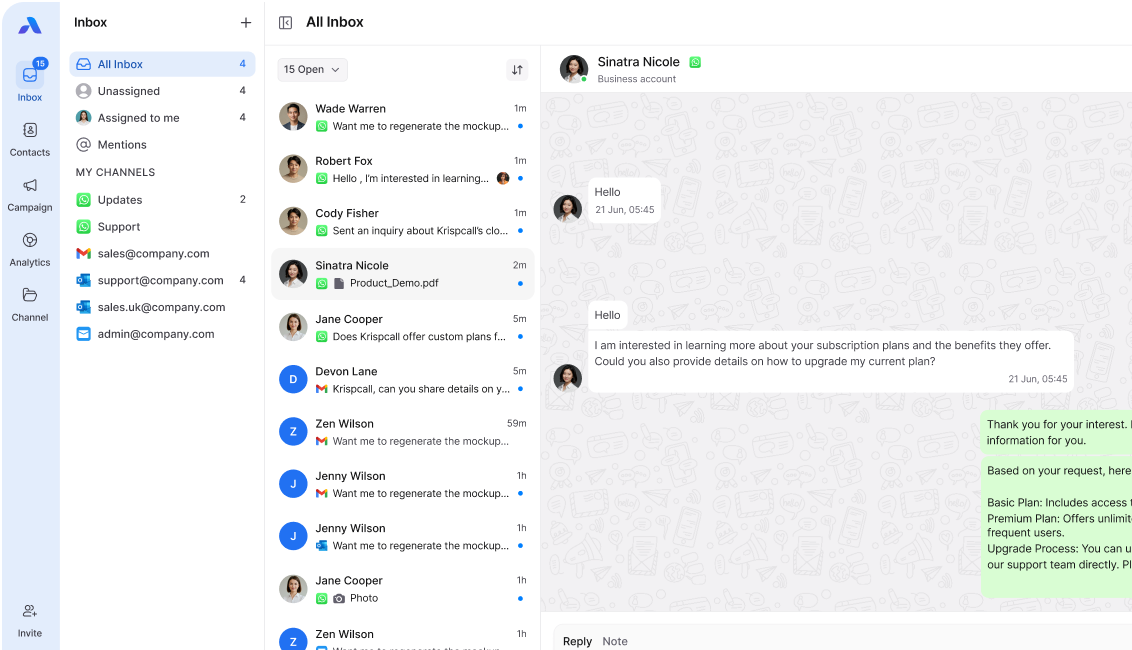
An omnichannel inbox brings all customer conversations—across email, chat, social media, and messaging apps—into one shared workspace. Instead of juggling multiple apps, your team can view, assign, and respond to all messages in a single place.
Key features include:
- Shared access for all agents
- Unified customer history across channels
- Automation for routing and tagging
- Analytics to track performance
When combined with a CRM, the omnichannel inbox becomes even more powerful by storing customer data, tracking interactions, and enabling personalized responses.
How do CRM tools connect with an omnichannel inbox?
CRMs provide the context and automation that make omnichannel inboxes efficient. When integrated:
- Every conversation is linked to a customer profile.
- Agents can view past interactions before replying.
- Workflows automatically assign tickets based on skills, workload, or priority.
- Analytics highlight response times, channel performance, and customer satisfaction trends.
This ensures no customer slips through the cracks—whether they reach you on WhatsApp at midnight or via email on Monday morning.
Top CRM Tools for Omnichannel Inbox Integration
1. Freshdesk
- Why it works: Centralized ticketing for email, chat, and social media, with Freddy AI for smart routing.
- Best for: Small to mid-sized teams seeking value and ease of use.
2. Salesforce Service Cloud
- Why it works: 360° customer view, omnichannel routing, and advanced AI insights.
- Best for: Enterprises that need scalability and already use Salesforce.
3. Zendesk
- Why it works: Strong multichannel support with shared inboxes and advanced reporting.
- Best for: Customer support-focused teams wanting reliability.
4. HubSpot Service Hub
- Why it works: Combines CRM, marketing, and service in one stack; seamless shared inbox.
- Best for: Businesses that want all-in-one simplicity.
5. Zoho CRM / Zoho Desk
- Why it works: Affordable, flexible multi-channel support with automation.
- Best for: Cost-conscious teams that still want omnichannel functionality.
6. Intercom
- Why it works: Excellent live chat, in-app messages, and automation.
- Best for: SaaS or product-driven companies.
7. LiveAgent
- Why it works: Brings chat, email, phone, and social into one interface.
- Best for: Small teams needing a traditional helpdesk plus omnichannel support.
8. Microsoft Dynamics 365
- Why it works: Strong AI, Microsoft ecosystem integration, and omnichannel engagement.
- Best for: Enterprises already using Microsoft products.
9. ControlHippo
- Why it works: Shared inbox for WhatsApp and social channels, with analytics and labels.
- Best for: SMEs wanting affordable messaging consolidation.
10. Nimble
- Why it works: Focus on relationship management with email + social inbox integration.
- Best for: Smaller teams relying heavily on social + email communication.
Benefits of connecting CRM with an omnichannel inbox
- Faster responses: No missed or delayed customer messages.
- Better agent productivity: Shared inbox reduces duplication.
- Consistent customer experience: Unified data across channels.
- Scalable communication: Easy to add more channels or agents.
- Stronger insights: Analytics guide strategy and improvements.
Best practices for CRM + omnichannel inbox success
- Map your customer journey before deciding on tools.
- Prioritize key channels (e.g., WhatsApp, Facebook Messenger) based on your audience.
- Automate repetitive tasks like greetings and FAQs.
- Set response time goals to stay consistent.
- Review analytics regularly to refine workflows.
Final Thoughts
The right CRM tool, when paired with an omnichannel inbox, helps your team connect, respond, and build loyalty across every channel your customers use. Whether you’re a small business scaling up or an enterprise optimizing global communication, these platforms make omnichannel communication seamless.